from functools import partial
from fasthtml.jupyter import *Building SolveIt in SolveIt
I give you a challenge: can you build SolveIt in SolveIt in SolveIt?
Agents
Approaching AI
LLMs
SolveIt
Programming
HTML
Reimplementing a light version of SolveIt with FastHTML, Basecoat, and within SolveIt.

This app is built on the techniques taught in Lessons 4, 5, and 6 of the SolveIt course led by Jeremy Howard who created the first modern LLM in 2018, and Johnothan Whitaker. SolveIt is also a brilliant problem-solving framework and interactive platform, that puts you in control–not the LLM.
Also thanks to Rens Dimmendaal for his dialog on how to deploy an app to Plash from SolveIt.
This blog post is a rendered documentation of a very, very basic reimplementation of SolveIt using FastHTML as the web framework. The main goal of this exercise was to exercise my web development and HTMX skillz. Play with the app at this link. Or watch the brief overview below.
SolveIt is an IDE of sorts that’s not only tailored towards coding, but a variety of other tasks from writing to problem solving to planning to learning to exploring and what not. Its premise revolves around the LLM putting the human in control, and thereby boosting human performance and capability. A core part of why SolveIt works so well is that your work is the LLM context.
Many parts of this app can still be improved, refactored, or made more efficient. Play with the app at this link.
Features include:
- Code/LLM/Note cells
- Context aware LLM
- Restore functionality
- Create multiple dialogs
- Rename dialogs
- Chinese/English localization
Certain FastHTML components of my app have been directly rendered as a part of this page. The FastHTML routes have not been and have been displayed as an image–these would otherwise be rendered in a Jupyter Notebook.
Settings and Headers
::: {#243ffab3 .cell 0=‘e’ 1=‘x’ 2=‘p’ 3=‘o’ 4=‘r’ 5=‘t’ time_run=‘2026-01-22T00:33:56.461282+00:00’}
from fasthtml.common import *:::
::: {#f9ccd095 .cell 0=‘e’ 1=‘x’ 2=‘p’ 3=‘o’ 4=‘r’ 5=‘t’ time_run=‘2026-01-22T00:33:56.462308+00:00’}
bsc_hdrs = (
    Script(src="https://cdn.jsdelivr.net/npm/@tailwindcss/browser@4"),  # Need to download first.
    Link(rel='stylesheet', href='https://cdn.jsdelivr.net/npm/basecoat-css@0.3.6/dist/basecoat.cdn.min.css'),
    Script(src='https://cdn.jsdelivr.net/npm/basecoat-css@0.3.6/dist/js/all.min.js', defer=True),
)
:::
::: {#7d1e280a .cell 0=‘e’ 1=‘x’ 2=‘p’ 3=‘o’ 4=‘r’ 5=‘t’ time_run=‘2026-01-22T00:33:56.482447+00:00’}
app = FastHTML(hdrs=(bsc_hdrs, MarkdownJS(), HighlightJS(langs=['python'])), session_cookie='mysessioncookie', debug=True)
rt = app.route
:::
A custom session cookie needs to be set for FastHTML sessions to work in SolveIt as SolveIt currently uses the default one.
Preview
Here I create a preview helper function that will allow me to interactively preview various components of the app.
server = JupyUvi(app)def get_preview(app):
return partial(HTMX, app=app, host=None, port=None)
prev = get_preview(app); prev()render_ft()render_ft will render any output FastHTML. prev will display it in the context of the FastHTML app.
Database
Creating a database to store users and their dialogs, with dialogs linked to users via uid.
::: {#1f39f676 .cell 0=‘e’ 1=‘x’ 2=‘p’ 3=‘o’ 4=‘r’ 5=‘t’ time_run=‘2026-01-22T00:33:56.637473+00:00’}
from fastlite import *:::
::: {#88d6aa36 .cell 0=‘e’ 1=‘x’ 2=‘p’ 3=‘o’ 4=‘r’ 5=‘t’ time_run=‘2026-01-22T00:33:56.668265+00:00’}
db = database('solvish.db'):::
db<Database <apsw.Connection object "/app/data/forbo7.github.io/forblog/posts/solvish.db" at 0x70ee23760500>>::: {#dd112d66 .cell 0=‘e’ 1=‘x’ 2=‘p’ 3=‘o’ 4=‘r’ 5=‘t’ time_run=‘2026-01-22T00:33:57.092178+00:00’}
class User: id:int; restore_code:str
class Dialog: id:int; uid:int; dialog_num:int; name:str; messages:str; server_session:str
:::
::: {#6bd3be8e .cell 0=‘e’ 1=‘x’ 2=‘p’ 3=‘o’ 4=‘r’ 5=‘t’ time_run=‘2026-01-22T00:33:57.093191+00:00’}
users = db.create(User, transform=True)
dialogs = db.create(Dialog, pk=('uid', 'dialog_num'), transform=True)
:::
Tables will not be overwritten as db.create() is idempotent.
users.delete_where()
dialogs.delete_where()
<Table dialog (id, uid, dialog_num, name, messages, server_session)>.delete_where with no arguments passed will drop all rows from the table.
New Dialog
Creating a new dialog first auto-increments dialog_num based on the user’s existing dialogs, then sets session['current_dialog'] to track which dialog is active. The dialog is stored in the dialogs table for persistence across sessions, while also being loaded into user_chats as a live chat object for the current server session.
::: {#b7b8f919 .cell 0=‘e’ 1=‘x’ 2=‘p’ 3=‘o’ 4=‘r’ 5=‘t’ time_run=‘2026-01-22T00:33:57.163073+00:00’}
from lisette.core import *
from toolslm.shell import get_shell

sp = 'Respond in the language the user uses; The user has access to a Python interpreter that you can view; NEVER copy the format of the code interpreter messsages in your response.'
def make_chat(hist=[]): return Chat('moonshot/kimi-k2-0711-preview', hist=hist, sp=sp), get_shell()
:::
make_chat()(<lisette.core.Chat at 0x70ee1a849eb0>,
<IPython.terminal.interactiveshell.TerminalInteractiveShell at 0x70ee1a849f40>)As my Kimi API key is compatable with servers in China, I have to change the Moonshoot endpoint.
::: {#35143833 .cell 0=‘e’ 1=‘x’ 2=‘p’ 3=‘o’ 4=‘r’ 5=‘t’ time_run=‘2026-01-22T00:33:58.702646+00:00’}
os.environ['MOONSHOT_API_BASE'] = 'https://api.moonshot.cn/v1':::
# from cachy import enable_cachy; enable_cachy()cachy will cache my API calls.
make_chat()[0]('what do you have access to?')I can see everything you see in the chat, including any code you run and its output. I don’t have direct access to your file system, network, or any other external resources—only what you explicitly show me in the conversation.
- id:
chatcmpl-6971707810ede230dafd4d84 - model:
moonshot/kimi-k2-0711-preview - finish_reason:
stop - usage:
Usage(completion_tokens=49, prompt_tokens=54, total_tokens=103, completion_tokens_details=None, prompt_tokens_details=None)
::: {#50efa44f .cell 0=‘e’ 1=‘x’ 2=‘p’ 3=‘o’ 4=‘r’ 5=‘t’ time_run=‘2026-01-22T00:34:01.492003+00:00’}
from coolname import generate_slug

@rt
def create_dialog(session):
    uid = session.get('userid')
    existing = dialogs(where=f'uid={uid}')
    dnum = max((d.dialog_num for d in existing), default=0) + 1
    session['current_dialog'] = dnum
    dialogs.insert(uid=uid, dialog_num=dnum, name=generate_slug(2), messages='[]')
    user_chats[(uid,dnum)] = make_chat()
    return Div(hx_get=f'/dialog?dnum={dnum}', hx_trigger='load', hx_target='#content', hx_swap='innerHTML')
:::
Session Persistance
::: {#67b4dc4e .cell 0=‘e’ 1=‘x’ 2=‘p’ 3=‘o’ 4=‘r’ 5=‘t’ time_run=‘2026-01-22T00:34:01.506942+00:00’}
user_chats = {}:::
I’ll be handling session persistance with this user_chats dictionary. If my server restarts, it means user_chats will be erased and thus a new session will be created for all users. Users can input their restore code to retrieve back their data.
::: {#89ceda80 .cell 0=‘e’ 1=‘x’ 2=‘p’ 3=‘o’ 4=‘r’ 5=‘t’ time_run=‘2026-01-22T00:34:01.511262+00:00’}
def ensure_user(session):
    uid = session.get('userid')
    if not uid or uid not in users:
        u = users.insert(restore_code=generate_slug(3))
        session['userid'] = u.id
    return session['userid']
:::
fake_session = {}uid = ensure_user(fake_session)
fake_session, uid({'userid': 1}, 1)::: {#9ac5a9ef .cell 0=‘e’ 1=‘x’ 2=‘p’ 3=‘o’ 4=‘r’ 5=‘t’ time_run=‘2026-01-22T00:34:01.526400+00:00’}
from fastcore.all import *
import json

def ensure_dialog(session):
    uid, dnum = map(session.get, ('userid', 'current_dialog'))
    if (uid, dnum) in user_chats: return
    elif dnum and (uid, dnum) in dialogs:
        d = dialogs[(uid, dnum)]
        user_chats[(uid, dnum)] = make_chat(json.loads(d.messages))
    else: create_dialog(session)
:::
ensure_dialog acts as a lazy loader for chat sessions. It first checks whether the user’s current dialog is already active in memory—if so, there’s nothing to do. If the dialog exists in the database but hasn’t been loaded yet, it retrieves the stored messages and reconstructs the chat object. Otherwise, when no dialog exists at all, it creates a fresh one for the user.
ensure_dialog(fake_session)
user_chats
{(1, 1): (<lisette.core.Chat at 0x70ee1a6efda0>,
<IPython.terminal.interactiveshell.TerminalInteractiveShell at 0x70ee225f31a0>)}::: {#f4bf5236 .cell 0=‘e’ 1=‘x’ 2=‘p’ 3=‘o’ 4=‘r’ 5=‘t’ time_run=‘2026-01-22T00:34:01.546425+00:00’}
from contextvars import ContextVar
current_lang = ContextVar('lang', default='en'); current_lang
<ContextVar name='lang' default='en' at 0x70ee19141df0>:::
Every time a request is made, a new ContextVar is created. This is a way I can keep language preferences seperate for each user.
::: {#f4830cbf .cell 0=‘e’ 1=‘x’ 2=‘p’ 3=‘o’ 4=‘r’ 5=‘t’ time_run=‘2026-01-22T00:34:01.551464+00:00’}
@rt
def setsession(session):
    current_lang.set(session.setdefault('lang', 'en'))
    uid = ensure_user(session)
    ensure_dialog(session)
:::
prev(setsession)The cookie only stores the user id. The data for the user is stored inside the current Python runtime. Once the runtime ends, the data is lost. The database permanently stores everything.
users()[User(id=1, restore_code='provocative-lori-of-acceptance')]dialogs()[Dialog(id=None, uid=1, dialog_num=1, name='viridian-pegasus', messages='[]', server_session=None)]user_chats{(1, 1): (<lisette.core.Chat at 0x70ee1a6efda0>,
<IPython.terminal.interactiveshell.TerminalInteractiveShell at 0x70ee225f31a0>)}@rt
def debug(session):
return Pre(str(dict(session)))
prev(debug)
@rt
def reset(session):
    session.clear()
    users.delete_where()
    dialogs.delete_where()
    return session
I won’t be exporting these two routes into the final application, else it’d allow users to mess around with other users!
Localization
A translation dictionary stores the strings for both Chinese and English. The helper function t() performs the localization.
::: {#95173331 .cell 0=‘e’ 1=‘x’ 2=‘p’ 3=‘o’ 4=‘r’ 5=‘t’ hide_input=‘true’ time_run=‘2026-01-22T00:34:01.589178+00:00’}
T = {
    'zh': {
        'input_placeholder': '输入内容···',
        'submit': '提交',
        'ask_model': '问问模型···',
        'your_code': '你的代码···',
        'any_thoughts': '有啥想法···',
        'enter_code': '输入代码···',
        'code': '代码',
        'prompt': '题词',
        'note': '笔记',
        'tab': '标签',
        'all_dialogs': '所有对话',
        'new_dialog': '新对话',
        'delete': '删除',
        'save': '保存',
        'solveit_lite': 'solveit-轻量版',
        'footer': '由 FastHTML 匠心打造',
        'restore_code': '恢复码',
        'restore_failed': '‼ 恢复失败',
        'restore_error': '找不到与此恢复码关联的账户,请检查后重试。',
        'enter_restore_code': '输入恢复码···',
    },
    'en': {
        'input_placeholder': 'Enter content...',
        'submit': 'Submit',
        'ask_model': 'Ask the model...',
        'your_code': 'Your code...',
        'any_thoughts': 'Any thoughts...',
        'enter_code': 'Enter code...',
        'code': 'Code',
        'prompt': 'Prompt',
        'note': 'Note',
        'tab': 'Tab',
        'all_dialogs': 'All Dialogs',
        'new_dialog': 'New Dialog',
        'delete': 'Delete',
        'save': 'Save',
        'solveit_lite': 'solveit-lite',
        'footer': 'Crafted with FastHTML',
        'restore_code': 'Restore Code',
        'restore_failed': '‼ Restore Failed',
        'restore_error': 'No account found with this restore code. Please check and try again.',
        'enter_restore_code': 'Enter restore code...',
    }
}
:::
::: {#f66dc855 .cell 0=‘e’ 1=‘x’ 2=‘p’ 3=‘o’ 4=‘r’ 5=‘t’ time_run=‘2026-01-22T00:34:01.593643+00:00’}
def t(key, session=None):
    lang = session.get('lang', 'zh') if session else current_lang.get()
    return T[lang].get(key, key)
:::
t('ask_model', {'lang':'zh'})'问问模型···'Chat Bubbles
Bubbles that display the dialog content. Each bubble type has its own color scheme—blue for code, red for prompts, and green for notes.
::: {#4a5b2004 .cell 0=‘e’ 1=‘x’ 2=‘p’ 3=‘o’ 4=‘r’ 5=‘t’ time_run=‘2026-01-22T00:34:01.603161+00:00’}
def Bubble(text, color, type='q', marked=True):
    colors = {
        'code': 'border-blue-500 bg-blue-50',
        'note': 'border-green-500 bg-green-50',
        'prompt': 'border-red-500 bg-red-50'
    }
    cls = f"{'marked' if marked else ''} {'ml-6' if type=='r' else ''} flex w-max max-w-[75%] flex-col gap-2 rounded-lg px-3 py-2 text-sm border-2 {colors[color]}"
    return Div(text, cls=cls)
:::
prev(Bubble('**嗨喽**', 'note'))prev(Div(
Bubble('嗨!', 'prompt'),
Bubble('哈喽!', 'prompt', 'r')
))prev(Bubble('''
```py
print('嗨!!!')
''', 'code'))Component Wrappers
::: {#06830b37 .cell 0=‘e’ 1=‘x’ 2=‘p’ 3=‘o’ 4=‘r’ 5=‘t’ time_run=‘2026-01-22T00:34:01.636405+00:00’}
import fasthtml.components as fc:::
::: {#0db9e155 .cell 0=‘e’ 1=‘x’ 2=‘p’ 3=‘o’ 4=‘r’ 5=‘t’ time_run=‘2026-01-22T00:34:01.640925+00:00’}
def mk_comp(name, def_cls):
    comp = getattr(fc, name)
    globals()[name] = lambda *args, var='', cls='', **kwargs: comp(*args, cls=f'{def_cls}{"-"+var if var else ""} {cls}', **kwargs)
:::
This wrapper will allow us to define HTML components with Basecoat styling without redundantly stating what that component is.
Before:
prev(Button('🔘', cls='btn'))prev(Button('🔘', cls='btn-destructive'))::: {#2e0f1420 .cell 0=‘e’ 1=‘x’ 2=‘p’ 3=‘o’ 4=‘r’ 5=‘t’ time_run=‘2026-01-22T00:34:01.661349+00:00’}
mk_comp('Button', 'btn')
mk_comp('Input', 'input')
mk_comp('Textarea', 'textarea')
mk_comp('Label', 'label')
:::
After:
prev(Button('🔘'))prev(Button('🔘', var='destructive'))to_xml(Button('🔘')), to_xml(Button('🔘', var='destructive'))('<button class="btn ">🔘</button>',
'<button class="btn-destructive ">🔘</button>')Input Box
The input area that will be used for entering messages to the dialog.
::: {#ae807178 .cell 0=‘e’ 1=‘x’ 2=‘p’ 3=‘o’ 4=‘r’ 5=‘t’ time_run=‘2026-01-22T00:34:01.687299+00:00’}
def Inp(type='text', placeholder='输入内容···', id='inp', oob=False, **kwargs):
    return Textarea(type='text', rows=1, placeholder=placeholder, id=id, cls='font-mono', **(dict(hx_swap_oob='true') if oob else {}), **kwargs)
:::
prev(Inp())to_xml(Inp())'<textarea type="text" rows="1" placeholder="输入内容···" id="inp" class="textarea font-mono" name="inp"></textarea>'Route Helper Functions
Helper functions for managing chat sessions and rendering responses. get_chat retrieves the active chat and shell for the current user’s dialog. sync_hist persists the conversation history to the database. mk_reply generates the UI response—a pair of bubbles (user input and model output) along with an OOB swap to clear the input field.
user_chats{(1, 1): (<lisette.core.Chat at 0x70ee1a6efda0>,
<IPython.terminal.interactiveshell.TerminalInteractiveShell at 0x70ee225f31a0>)}fake_session = {'userid':1, 'current_dialog':1}::: {#7eba2cc7 .cell 0=‘e’ 1=‘x’ 2=‘p’ 3=‘o’ 4=‘r’ 5=‘t’ time_run=‘2026-01-22T00:34:01.725230+00:00’}
def get_chat(session): return user_chats[(session['userid'], session['current_dialog'])]:::
get_chat(fake_session)(<lisette.core.Chat at 0x70ee1a6efda0>,
<IPython.terminal.interactiveshell.TerminalInteractiveShell at 0x70ee225f31a0>)::: {#649b261d .cell 0=‘e’ 1=‘x’ 2=‘p’ 3=‘o’ 4=‘r’ 5=‘t’ time_run=‘2026-01-22T00:34:01.734433+00:00’}
def sync_hist(session, hist): dialogs.update(uid=session['userid'], dialog_num=session['current_dialog'], messages=json.dumps([h.model_dump() if hasattr(h, 'model_dump') else h for h in hist])):::
c = Chat('moonshot/kimi-k2-0711-preview', sp=sp)
c('你是谁?'); c.hist
[{'role': 'user', 'content': '你是谁?'},
Message(content='我是Kimi,由月之暗面科技有限公司训练的大语言模型。很高兴为你提供帮助!', role='assistant', tool_calls=None, function_call=None, provider_specific_fields={'refusal': None})]sync_hist(fake_session, c.hist)json.loads(dialogs[(1, 1)].messages)[{'role': 'user', 'content': '你是谁?'},
{'content': '我是Kimi,由月之暗面科技有限公司训练的大语言模型。很高兴为你提供帮助!',
'role': 'assistant',
'tool_calls': None,
'function_call': None,
'provider_specific_fields': {'refusal': None}}]::: {#c862e101 .cell 0=‘e’ 1=‘x’ 2=‘p’ 3=‘o’ 4=‘r’ 5=‘t’ time_run=‘2026-01-22T00:34:02.717276+00:00’}
def mk_reply(inp, out, color, name='inp', placeholder='输入内容···'): return Inp(oob=True, name=name, placeholder=placeholder, onkeydown="if(event.shiftKey && event.key==='Enter') { event.preventDefault(); this.form.requestSubmit(); }"), Div(cls='space-y-0.5')(
    Bubble(inp, color),
    Bubble(out, color, 'r') if out else None)
:::
prev(mk_reply('呵呵', '哈哈', 'prompt'))LLM Route
r = c('嗨'); r.choices[0].message.content'嗨!有什么我可以帮你的吗?'::: {#744b0ef0 .cell 0=‘e’ 1=‘x’ 2=‘p’ 3=‘o’ 4=‘r’ 5=‘t’ time_run=‘2026-01-22T00:34:03.555060+00:00’}
def add_hist(hist, type, content='', role='user'):
    hist.append(dict(role=role, content=content, type=type))
:::
I’ve added a type key to allow me to know in what style to render the message (blue for 'code', red for 'prompt', and green for 'note') when I load them.
add_hist(c.hist, 'note', content='这只是一张便条')
c.hist
[{'role': 'user', 'content': '你是谁?'},
Message(content='我是Kimi,由月之暗面科技有限公司训练的大语言模型。很高兴为你提供帮助!', role='assistant', tool_calls=None, function_call=None, provider_specific_fields={'refusal': None}),
{'role': 'user', 'content': '嗨'},
Message(content='嗨!有什么我可以帮你的吗?', role='assistant', tool_calls=None, function_call=None, provider_specific_fields={'refusal': None}),
{'role': 'user', 'content': '这只是一张便条', 'type': 'note'}]::: {#e8fb36a9 .cell 0=‘e’ 1=‘x’ 2=‘p’ 3=‘o’ 4=‘r’ 5=‘t’ time_run=‘2026-01-22T00:34:03.565395+00:00’}
import json
@rt
def ask_llm(qry:str, session):
    c,sh = get_chat(session)
    res = c(qry)
    content = res.choices[0].message.content
    c.hist[-2]['type'] = 'prompt'
    c.hist[-1]['type'] = 'prompt'
    sync_hist(session, c.hist)
    return mk_reply(qry, content, 'prompt', 'qry', t('ask_model'))
:::
prev('/ask_llm?qry=你好')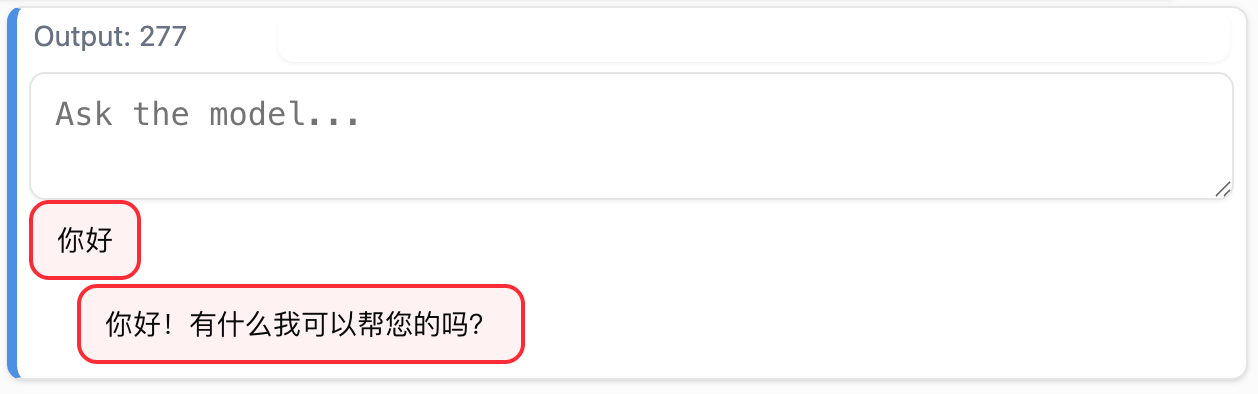
ask_llm, alongside quering the model, stores the conversation with a type marker for rendering and syncs the history to the database.
::: {#a3bcde66 .cell 0=‘e’ 1=‘x’ 2=‘p’ 3=‘o’ 4=‘r’ 5=‘t’ time_run=‘2026-01-22T00:34:03.574612+00:00’}
def test(inp):
    return Div(Div(id='msgs'),
    Form(hx_post=ask_llm, hx_target='#msgs', hx_swap='beforeend', cls='flex items-center space-x-2')(inp, Button('提交', type='submit')))
:::
prev(test(Inp(id='qry')))user_chats{(1, 1): (<lisette.core.Chat at 0x70ee1a6efda0>,
<IPython.terminal.interactiveshell.TerminalInteractiveShell at 0x70ee225f31a0>)}Code Route
sh = get_shell(); sh<IPython.terminal.interactiveshell.TerminalInteractiveShell at 0x70ee190c31d0>??get_shelldef get_shell()->TerminalInteractiveShell:
"Get a `TerminalInteractiveShell` with minimal functionality"
sh = TerminalInteractiveShell()
sh.logger.log_output = sh.history_manager.enabled = False
dh = sh.displayhook
dh.finish_displayhook = dh.write_output_prompt = dh.start_displayhook = lambda: None
dh.write_format_data = lambda format_dict, md_dict=None: None
sh.logstart = sh.automagic = sh.autoindent = False
sh.autocall = 0
sh.system = lambda cmd: None
return shFile: /usr/local/lib/python3.12/site-packages/toolslm/shell.py
get_shell relies on IPython under the hood.
::: {#0f20abdc .cell 0=‘e’ 1=‘x’ 2=‘p’ 3=‘o’ 4=‘r’ 5=‘t’ time_run=‘2026-01-22T00:34:23.268921+00:00’}
def ex(code, sh):
    res = sh.run_cell(code)
    return res.result if res.result else res.stdout
:::
::: {#3cd307bc .cell 0=‘e’ 1=‘x’ 2=‘p’ 3=‘o’ 4=‘r’ 5=‘t’ time_run=‘2026-01-22T00:34:23.654002+00:00’}
@rt
def ex_code(code:str, session):
    c,sh = get_chat(session)
    add_hist(c.hist, 'code', f'[INTERPRETER INPUT]\n```py\n{code}\n```')
    res = ex(code, sh)
    add_hist(c.hist, 'code', f'[INTERPRETER OUTPUT]\n```py\n{res}\n```', role='assistant')
    sync_hist(session, c.hist)
    return mk_reply(inp=f'```py\n{code}\n```', out= f'```py\n{res}\n```', color='code', name='code', placeholder=t('your_code'))
:::
ex_code similarly also stores the conversation with a type marker and syncs with the database. A special '[INTERPRETER INPUT/OUTPUT]' marker is also added as indicators for the LLM.
prev(Div(
    Div(id='msgs'),
    Form(hx_post=ex_code, hx_target='#msgs', hx_swap='beforeend', cls='flex items-center space-x-2')(Inp(name='code'), Button('提交', type='submit'))
))
Note Route
::: {#a591691c .cell 0=‘e’ 1=‘x’ 2=‘p’ 3=‘o’ 4=‘r’ 5=‘t’ time_run=‘2026-01-22T00:34:34.562110+00:00’}
@rt
def add_note(note:str, session):
    c,sh = get_chat(session)
    add_hist(c.hist, 'note', content=note,)
    sync_hist(session, c.hist)
    return mk_reply(note, '', 'note', 'note', t('any_thoughts'))
:::
def test(inp):
    return Div(Div(id='msgs'),
Form(hx_post=add_note, hx_target='#msgs', hx_swap='beforeend', cls='flex items-center space-x-2')(inp, Button('提交', type='submit')))prev(test(Inp(id='note')))Editor Component
Three editor components for the different message types. Each editor is a form that posts to its corresponding route (ex_code, ask_llm, or add_note) and appends the result to the message area.
::: {#3da6f419 .cell 0=‘e’ 1=‘x’ 2=‘p’ 3=‘o’ 4=‘r’ 5=‘t’ time_run=‘2026-01-22T00:34:55.717291+00:00’}
@rt
def code_editor(session): return Form(hx_post=ex_code, hx_target='#msgs', hx_swap='beforeend', cls='flex items-stretch space-x-2')(Inp(placeholder=t('enter_code', session), name='code', onkeydown="if(event.shiftKey && event.key==='Enter') { event.preventDefault(); this.form.requestSubmit(); }"), Button(t('submit', session), type='submit', cls='self-stretch h-auto'))
:::
The editor routes need the session cookie for translations because each editor is loaded in a separate request. Since ContextVar resets with each new request, we need to re-set the language from the session at the start of each request.
prev(Div(Div(id='msgs'),Div(hx_get=code_editor, hx_trigger='load')))::: {#e85cd35e .cell 0=‘e’ 1=‘x’ 2=‘p’ 3=‘o’ 4=‘r’ 5=‘t’ time_run=‘2026-01-22T00:35:18.553389+00:00’}
@rt
def llm_editor(session): return Form(hx_post=ask_llm, hx_target='#msgs', hx_swap='beforeend', cls='flex items-center space-x-2')(Inp(placeholder=t('ask_model', session), name='qry', onkeydown="if(event.shiftKey && event.key==='Enter') { event.preventDefault(); this.form.requestSubmit(); }"), Button(t('submit', session), type='submit', cls='self-stretch h-auto'))
:::
prev(llm_editor)
::: {#3f0d14d8 .cell 0=‘e’ 1=‘x’ 2=‘p’ 3=‘o’ 4=‘r’ 5=‘t’ time_run=‘2026-01-22T00:35:37.352665+00:00’}
@rt
def note_editor(session): return Form(hx_post=add_note, hx_target='#msgs', hx_swap='beforeend', cls='flex items-center space-x-2')(Inp(placeholder=t('any_thoughts', session), name='note', onkeydown="if(event.shiftKey && event.key==='Enter') { event.preventDefault(); this.form.requestSubmit(); }"), Button(t('submit', session), type='submit', cls='self-stretch h-auto'))
:::
prev(note_editor)/bin/bash: -c: line 1: syntax error near unexpected token `../images/31_solveit_in_solveit/4.png'
/bin/bash: -c: line 1: `[](../images/31_solveit_in_solveit/4.png)'Tabs
A tabbed navigation bar that lets users switch between the three editor types—code, prompt, and note. Each tab triggers an HTMX request to load the corresponding editor form into the editor container.
::: {#e2b96dec .cell 0=‘e’ 1=‘x’ 2=‘p’ 3=‘o’ 4=‘r’ 5=‘t’ time_run=‘2026-01-22T00:39:32.407645+00:00’}
def Tab(title, id, hx_post, **kwargs): return fc.Button(title, id=f'{id}-tab', type='button', role='tab', hx_post=hx_post, hx_target='#editor', hx_swap='innerHTML', **kwargs):::
prev(Nav(Tab('标签', id='test', hx_post=None), cls='w-full', role='tablist'))::: {#355bf665 .cell 0=‘e’ 1=‘x’ 2=‘p’ 3=‘o’ 4=‘r’ 5=‘t’ time_run=‘2026-01-22T00:39:37.560871+00:00’}
def TabBar(cls='', *args, **kwargs):
    return Nav(
        Tab(t('code'), id='code', hx_post=code_editor),
        Tab(t('prompt'), id='qry', hx_post=llm_editor),
        Tab(t('note'), id='note', hx_post=note_editor),
        cls=f'w-full {cls}', role='tablist', *args, **kwargs
    )
:::
prev(Div(TabBar(), Div(id='editor'), cls='tabs w-full'))Render Existing Messages
::: {#764bf26a .cell 0=‘e’ 1=‘x’ 2=‘p’ 3=‘o’ 4=‘r’ 5=‘t’ time_run=‘2026-01-22T00:39:42.067948+00:00’}
@rt
def load_messages(session):
    c,sh = get_chat(session)
    for i in c.hist:
        role = i.get('role') if isinstance(i, dict) else i.role
        if role=='user':      yield Div(Bubble(i['content'].replace('[INTERPRETER INPUT]\n', ''), i['type']), cls='space-y-0.5')
        if role=='assistant': yield Div(Bubble(i['content'].replace('[INTERPRETER OUTPUT]\n', ''), i['type'], 'r'), cls='space-y-0.5')
:::
prev(f'/load_messages')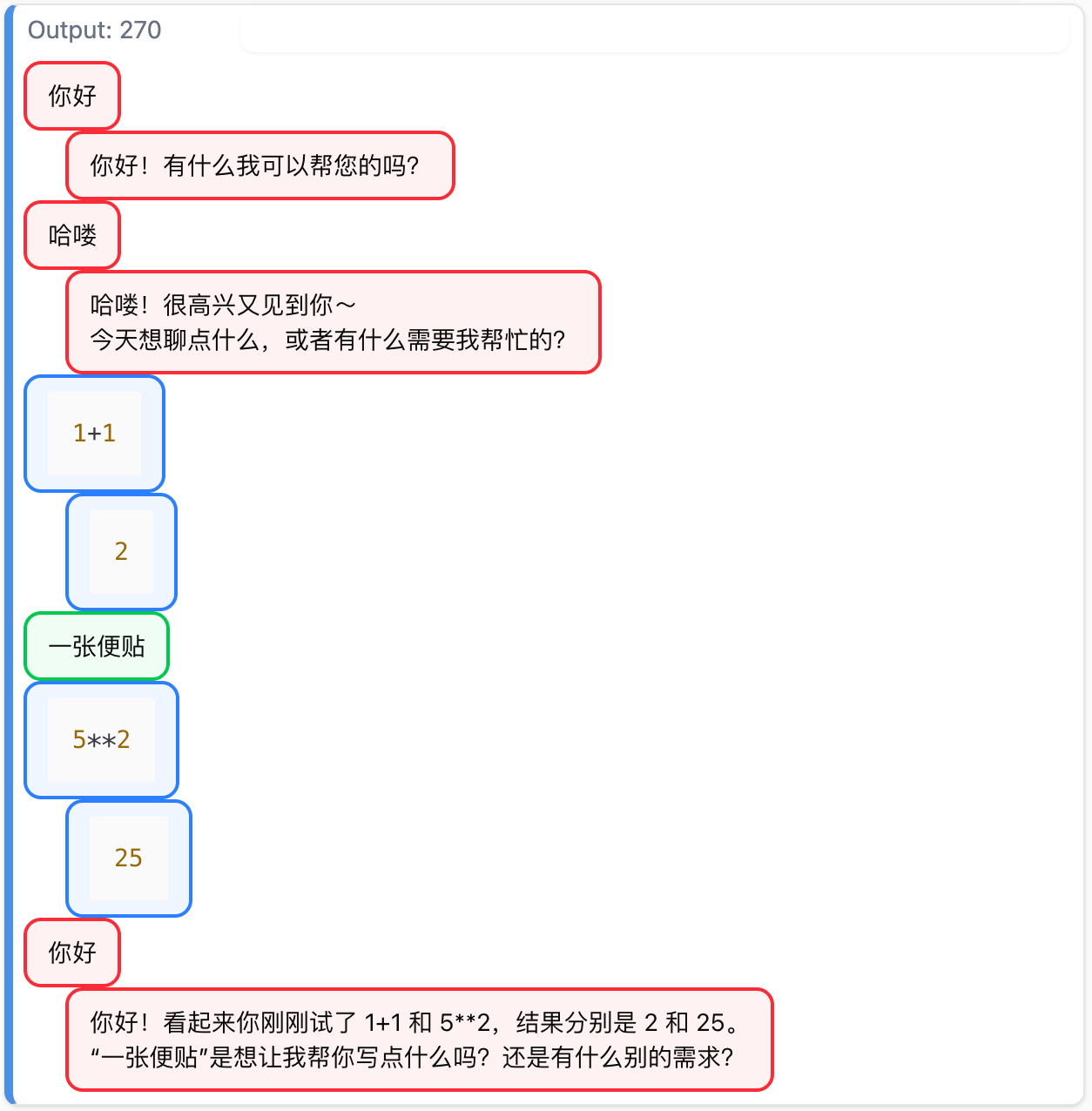
Dialog
The dialog component ties everything together—a title bar that supports inline editing, a message display area that loads existing conversation history, and the tabbed editor for adding new messages. Clicking a dialog name makes it editable, and saving updates the database immediately.
::: {#64ce33d2 .cell 0=‘e’ 1=‘x’ 2=‘p’ 3=‘o’ 4=‘r’ 5=‘t’ time_run=‘2026-01-22T00:40:04.037914+00:00’}
@rt
def edit_dname(session):
    dname = dialogs[(session['userid'], session['current_dialog'])].name
    return Form(id='dname', hx_post=save_dname, hx_target='#dname', hx_swap='outerHTML')(
        Input(value=dname, name='newname', autofocus=True, onfocus='this.select()', required=True, cls='text-2xl font-bold outline-none'),
        Button(t('save', session), type='submit')
    )
:::
::: {#9d6ae097 .cell 0=‘e’ 1=‘x’ 2=‘p’ 3=‘o’ 4=‘r’ 5=‘t’ time_run=‘2026-01-22T00:40:04.608020+00:00’}
@rt
def save_dname(session, newname:str):
    dialogs.update(uid=session['userid'], dialog_num=session['current_dialog'], name=newname)
    return DialogTitle(newname)
:::
::: {#dfb739b4 .cell 0=‘e’ 1=‘x’ 2=‘p’ 3=‘o’ 4=‘r’ 5=‘t’ time_run=‘2026-01-22T00:40:05.386759+00:00’}
def DialogTitle(name): return H1(name, cls='text-2xl font-bold', id='dname', hx_get=edit_dname, hx_target='#dname', hx_swap='outerHTML'):::
prev(DialogTitle('对话'))::: {#5f7ef951 .cell 0=‘e’ 1=‘x’ 2=‘p’ 3=‘o’ 4=‘r’ 5=‘t’ time_run=‘2026-01-22T00:40:10.636548+00:00’}
@rt
def dialog(dnum:int, session):
    session['current_dialog'] = dnum
    return Div(
        DialogTitle(dialogs[(session['userid'], dnum)].name),
        Div(id='msgs', cls='p-8 max-h-96 overflow-y-auto', hx_get=load_messages, hx_trigger='load'),
        TabBar(id='tabbar'),
        Div(id='editor'),
        cls='tabs w-full'
    )
:::
prev('dialog?dnum=1')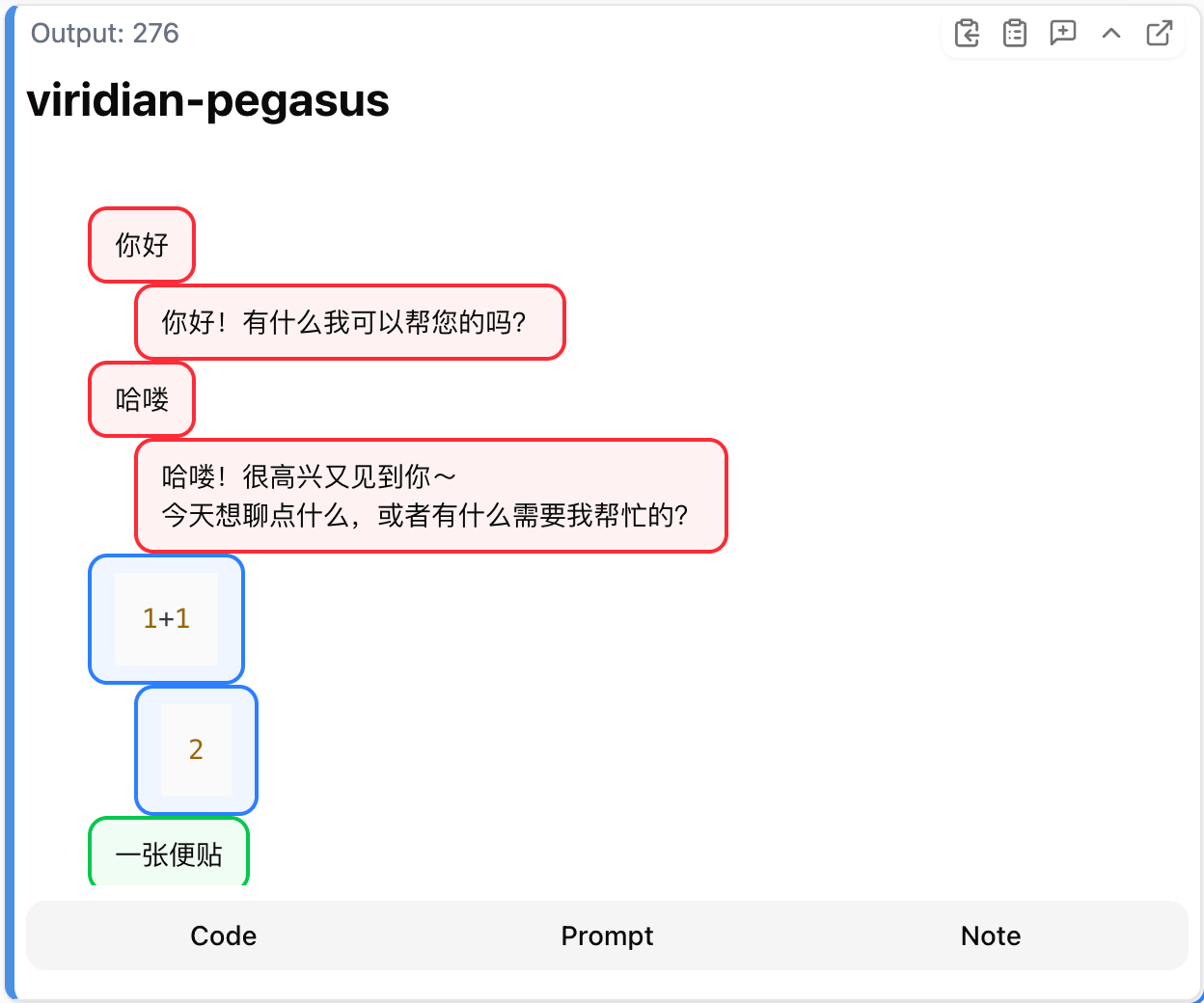
Delete Dialog
::: {#493dcf03 .cell 0=‘e’ 1=‘x’ 2=‘p’ 3=‘o’ 4=‘r’ 5=‘t’ time_run=‘2026-01-22T00:40:29.905945+00:00’}
@rt
def delete_dialog(session, dnum:int):
    uid = session.get('userid')
    dialogs.delete((uid, dnum))
    del user_chats[(uid, dnum)]
:::
fake_session{'userid': 1, 'current_dialog': 1}users(), dialogs()([User(id=1, restore_code='provocative-lori-of-acceptance')],
[Dialog(id=None, uid=1, dialog_num=1, name='viridian-pegasus', messages='[{"role": "user", "content": "\\u4f60\\u597d", "type": "prompt"}, {"content": "\\u4f60\\u597d\\uff01\\u6709\\u4ec0\\u4e48\\u6211\\u53ef\\u4ee5\\u5e2e\\u60a8\\u7684\\u5417\\uff1f", "role": "assistant", "tool_calls": null, "function_call": null, "provider_specific_fields": {"refusal": null}, "type": "prompt"}, {"role": "user", "content": "\\u54c8\\u55bd", "type": "prompt"}, {"content": "\\u54c8\\u55bd\\uff01\\u5f88\\u9ad8\\u5174\\u53c8\\u89c1\\u5230\\u4f60\\uff5e \\n\\u4eca\\u5929\\u60f3\\u804a\\u70b9\\u4ec0\\u4e48\\uff0c\\u6216\\u8005\\u6709\\u4ec0\\u4e48\\u9700\\u8981\\u6211\\u5e2e\\u5fd9\\u7684\\uff1f", "role": "assistant", "tool_calls": null, "function_call": null, "provider_specific_fields": {"refusal": null}, "type": "prompt"}, {"role": "user", "content": "[INTERPRETER INPUT]\\n```py\\n1+1\\n```", "type": "code"}, {"role": "assistant", "content": "[INTERPRETER OUTPUT]\\n```py\\n2\\n```", "type": "code"}, {"role": "user", "content": "\\u4e00\\u5f20\\u4fbf\\u8d34", "type": "note"}, {"role": "user", "content": "[INTERPRETER INPUT]\\n```py\\n5**2\\n```", "type": "code"}, {"role": "assistant", "content": "[INTERPRETER OUTPUT]\\n```py\\n25\\n```", "type": "code"}, {"role": "user", "content": "\\u4f60\\u597d", "type": "prompt"}, {"content": "\\u4f60\\u597d\\uff01\\u770b\\u8d77\\u6765\\u4f60\\u521a\\u521a\\u8bd5\\u4e86 1+1 \\u548c 5**2\\uff0c\\u7ed3\\u679c\\u5206\\u522b\\u662f 2 \\u548c 25\\u3002 \\n\\u201c\\u4e00\\u5f20\\u4fbf\\u8d34\\u201d\\u662f\\u60f3\\u8ba9\\u6211\\u5e2e\\u4f60\\u5199\\u70b9\\u4ec0\\u4e48\\u5417\\uff1f\\u8fd8\\u662f\\u6709\\u4ec0\\u4e48\\u522b\\u7684\\u9700\\u6c42\\uff1f", "role": "assistant", "tool_calls": null, "function_call": null, "provider_specific_fields": {"refusal": null}, "type": "prompt"}]', server_session=None)])user_chats{(1, 1): (<lisette.core.Chat at 0x70ee1a6efda0>,
<IPython.terminal.interactiveshell.TerminalInteractiveShell at 0x70ee225f31a0>)}delete_dialog(fake_session, 1)users(), dialogs()([User(id=1, restore_code='provocative-lori-of-acceptance')], [])user_chats{}Restore Dialog
The restore session feature allows users to recover their data if the server restarts or they switch devices. Users enter their unique restore code (generated at account creation), which looks up their account in the database. If found, it restores their session by setting the user ID, loading their first dialog, and redirecting to the main page. A destructive alert displays if the restore code is invalid.
::: {#b7ebe597 .cell 0=‘e’ 1=‘x’ 2=‘p’ 3=‘o’ 4=‘r’ 5=‘t’ time_run=‘2026-01-22T00:40:39.407474+00:00’}
insolveit = 'IN_SOLVEIT' in os.environ:::
insolveitTrueI’ve created the insolveit check to determine whether the app is running in my SolveIt instance or whether as a deployed app.
::: {#7c59ce58 .cell 0=‘e’ 1=‘x’ 2=‘p’ 3=‘o’ 4=‘r’ 5=‘t’ time_run=‘2026-01-22T00:40:41.808713+00:00’}
@rt
def restore_session(restore_code:str, session):
    if (u:=first(users('restore_code=?', [restore_code]))):
        session['userid'] = u.id
        existing = dialogs(where=f'uid={u.id}')
        if existing: session['current_dialog'] = existing[0].dialog_num
        setsession(session)
        return HtmxResponseHeaders(redirect='/main' if insolveit else '/')
    else: return Div(cls='alert-destructive')(H2(t('restore_failed')), Section(t('restore_error')))

    session['userid'] = first(users('restore_code=?', [restore_code])).id
    setsession(session)
:::
prev('/restore_session?restore_code=haha')
user_chats{}users[1].restore_code'provocative-lori-of-acceptance'user_chats = {}
prev(restore_session.to(restore_code=users[1].restore_code))user_chats{(1, 1): (<lisette.core.Chat at 0x70ee0bf336e0>,
<IPython.terminal.interactiveshell.TerminalInteractiveShell at 0x70ee19188fb0>)}prev(Div(
Form(hx_post=restore_session, hx_target='#alert-area', cls='flex items-end gap-2')(
Div()(
Label('恢复码', fr='restore_code', cls='mb-2'),
Input(placeholder='looks-like-this', type='text', name='restore_code')
),
Button('提交', type='submit')
),
Div(id='alert-area')
))::: {#b997e64f .cell 0=‘e’ 1=‘x’ 2=‘p’ 3=‘o’ 4=‘r’ 5=‘t’ time_run=‘2026-01-22T00:42:07.092837+00:00’}
def RestoreForm(session, id='restore-form', *args, **kwargs):
    return Form(hx_post=restore_session, hx_target='#alert-box', cls='flex items-end gap-2', id=id, *args, **kwargs)(
        Div(
            Label(t('restore_code'), ' · ', users[session['userid']].restore_code, fr='restore_code', cls='mb-2'),
            Input(type='text', name='restore_code', placeholder=t('enter_restore_code'))
        ),
        Button(t('submit'), type='submit')
    )
:::
prev(RestoreForm(fake_session))Dialog List
The dialog list component displays all dialogs belonging to the current user. The display_dialogs route fetches all user dialogs from the database and includes a “new dialog” card that triggers dialog creation. The restore code form is also embedded here, allowing users to recover their session from a different device.
::: {#7fde0067 .cell 0=‘e’ 1=‘x’ 2=‘p’ 3=‘o’ 4=‘r’ 5=‘t’ time_run=‘2026-01-22T00:42:13.946257+00:00’}
@rt
def current_dialog(session): return dialog(session.get('current_dialog'), session)
:::
::: {#d1206a9d .cell 0=‘e’ 1=‘x’ 2=‘p’ 3=‘o’ 4=‘r’ 5=‘t’ time_run=‘2026-01-22T00:42:14.672987+00:00’}
def DialogCard(d): return Div(id=f'dialog-{d.uid}{d.dialog_num}', cls='card p-4 hover:bg-gray-100 flex flex-row justify-between items-center')(
    Span(hx_get=dialog.to(dnum=d.dialog_num), hx_target='#content', cls='cursor-pointer')('💬 ', d.name),
    Button(t('delete'), var='destructive', hx_post=delete_dialog.to(dnum=d.dialog_num), hx_swap='delete', hx_target=f'#dialog-{d.uid}{d.dialog_num}')
)
:::
prev(DialogCard(first(dialogs())))::: {#4151e92e .cell 0=‘e’ 1=‘x’ 2=‘p’ 3=‘o’ 4=‘r’ 5=‘t’ time_run=‘2026-01-22T00:42:23.354678+00:00’}
@rt
def display_dialogs(session):
    ds = L(dialogs('uid=?', [session.get('userid')]))
    ds = ds.map(lambda d: DialogCard(d))
    return Div(cls='flex flex-col gap-2 max-w-xl')(
        Div(cls='flex items-center justify-between gap-4')(H1(t('all_dialogs', session), cls='text-2xl font-bold', id='all-dialogs-title'), RestoreForm(session)),
        Div(id='alert-box'),
        Div('➕', Span(t('new_dialog', session), id='new-dialog-text'), cls='card p-4 hover:bg-gray-100 cursor-pointer border-2 border-dashed flex flex-row items-center gap-2', hx_post=create_dialog, hx_target='#content'),
        Div(*ds, cls='flex flex-col gap-2 max-h-64 overflow-y-auto')
    )
:::
prev(Div(
    Div(id='content')(
        display_dialogs({'userid': 1, 'current_dialog': 11})
    )
))
Main Page
::: {#886bc7d5 .cell 0=‘e’ 1=‘x’ 2=‘p’ 3=‘o’ 4=‘r’ 5=‘t’ time_run=‘2026-01-22T00:42:30.692188+00:00’}
@rt
def toggle_lang(session):
    lang = 'zh' if session.get('lang') == 'en' else 'en'
    current_lang.set(lang)
    session['lang'] = lang
    return (
        H2(t('solveit_lite'), id='title', hx_swap_oob='true'),
        Button(t('all_dialogs'), id='dialogs-btn', hx_post=display_dialogs, hx_target='#content', var='secondary', hx_swap_oob='true'),
        Span(t('code'), hx_swap_oob='innerHTML:#code-tab'),
        Span(t('prompt'), hx_swap_oob='innerHTML:#qry-tab'),
        Span(t('note'), hx_swap_oob='innerHTML:#note-tab'),
        Div(id='editor', hx_swap_oob='true'),
        Footer(t('footer'), id='footer', cls='text-sm text-gray-400', hx_swap_oob='true'),
        RestoreForm(session, hx_swap_oob='true', id='restore-form'),
        H1(t('all_dialogs'), cls='text-2xl font-bold', id='all-dialogs-title', hx_swap_oob='true'),
        Span(t('new_dialog'), id='new-dialog-text', hx_swap_oob='true')
    )
:::
This route allows users to switch between Chinese and English with OOB swaps to update all translatable text across the page simultaneously.
::: {#e98d1f46 .cell 0=‘e’ 1=‘x’ 2=‘p’ 3=‘o’ 4=‘r’ 5=‘t’ time_run=‘2026-01-22T00:42:32.887451+00:00’}
@rt('/main' if insolveit else '/')
def main(session):
    setsession(session)
    return Div(id='body', cls='card p-8 max-w-4xl mx-auto my-4')(
        Header(cls='flex justify-between items-center')(H2(
            t('solveit_lite'), id='title'),
            Span(
                Button('🌐', var='secondary', hx_post=toggle_lang, hx_swap='none'),
                Button(t('all_dialogs'), id='dialogs-btn', hx_post=display_dialogs, hx_target='#content', var='secondary')
            )
        ),
        Section(id='content')(
            current_dialog(session)
        ),
        Footer(t('footer'), id='footer', cls='text-sm text-gray-400')
    )
:::
prev('/main')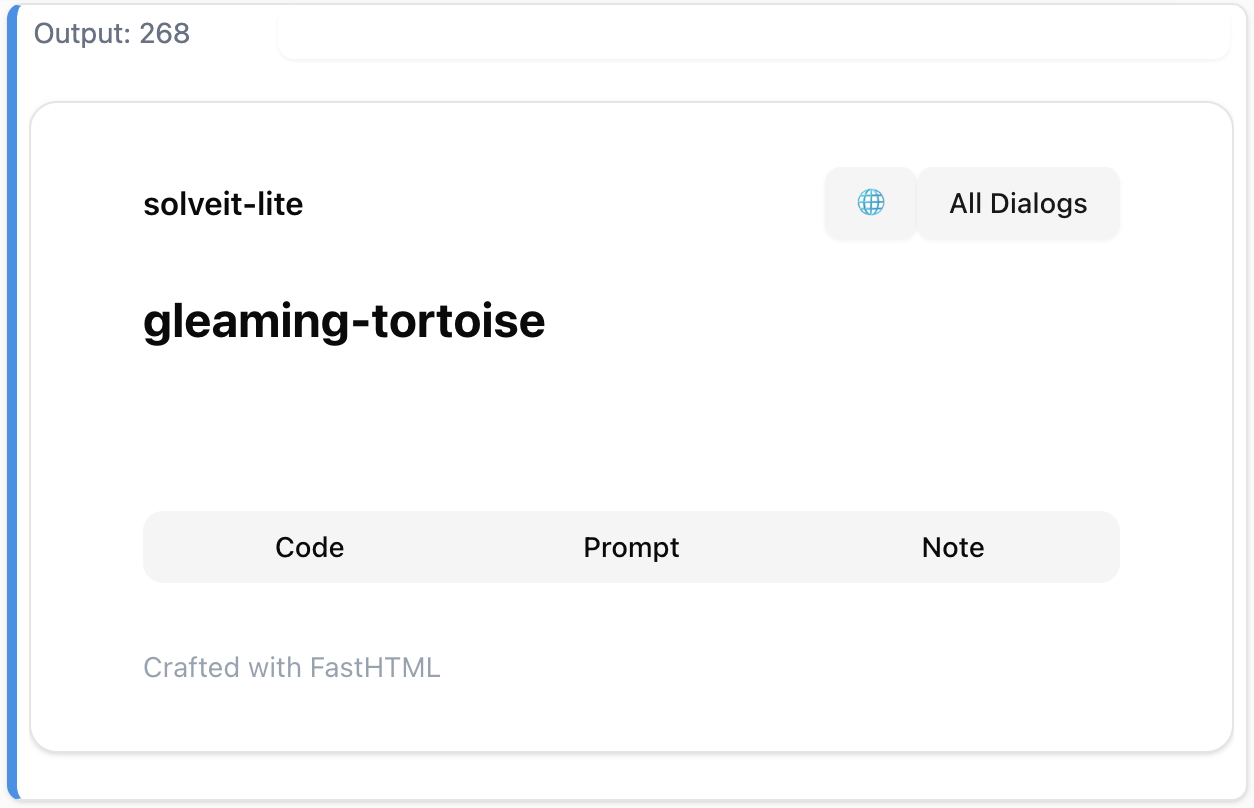
Deploy
::: {#b05651d9 .cell 0=‘e’ 1=‘x’ 2=‘p’ 3=‘o’ 4=‘r’ 5=‘t’}
if not insolveit: serve():::
Path('requirements.txt').write_text('''\
python-fasthtml
lisette
coolname
ipython
''')
!cat requirements.txt
python-fasthtml
lisette
coolname
ipythonPath('.plash').write_text('export PLASH_APP_NAME=solveit-lite-unofficial')
!cat .plashexport PLASH_APP_NAME=solveit-lite-unofficialPath('plash.env').write_text(f'export MOONSHOT_API_KEY={os.environ.get('MOONSHOT_API_KEY')}')75import plash_cli as pc
pc.deploy()'https://solveit-lite-unofficial.pla.sh'print(pc.logs())Build Start Time: 2026-01-16 01:30:30.917195+00:00
Step 1/14 : FROM plash:latest
---> 8c65e51fa2d2
Step 2/14 : ARG USER_UID=1000
---> Using cache
---> 781580c8e262
Step 3/14 : ARG USER_GID=1000
---> Using cache
---> dcf3956b8c50
Step 4/14 : RUN groupadd -g $USER_GID plash && useradd -u $USER_UID -g $USER_GID -m plash
---> Using cache
---> fe019dc49177
Step 5/14 : ENV PLASH_PRODUCTION=1
---> Using cache
---> a86e28497fc0
Step 6/14 : COPY .dockerignore setup.sh* ./
---> Using cache
---> 786f3c3d2c09
Step 7/14 : RUN if [ -f ./setup.sh ]; then echo "Found setup.sh, executing..." && chmod +x ./setup.sh && ./setup.sh; fi
---> Using cache
---> 3f80b2a299d3
Step 8/14 : COPY .dockerignore requirements.txt* ./
---> Using cache
---> dea62d9dd70b
Step 9/14 : RUN if [ -f ./requirements.txt ]; then echo "Found requirements.txt, executing..." && uv pip install -r ./requirements.txt --system; fi
---> Using cache
---> 241057bc8973
Step 10/14 : RUN chown -R plash:plash /app
---> Using cache
---> eb5b444c975f
Step 11/14 : USER plash
---> Using cache
---> d2eda950b2e1
Step 12/14 : ENV PATH="/home/plash/.local/bin:$PATH"
---> Using cache
---> 5631843ecbf7
Step 13/14 : EXPOSE 5001
---> Using cache
---> b1e69db470b1
Step 14/14 : ENTRYPOINT ["bash", "-c", "if [ -f ./plash.env ]; then . ./plash.env; fi && python main.py"]
---> Using cache
---> 5ad4e58136f3
Successfully built 5ad4e58136f3
Successfully tagged 9d102cbb-e493-4ce7-9110-09dbf5c01851:latest
Build End Time: 2026-01-16 01:30:31.194696+00:00
print(pc.logs(mode='app'))INFO: Will watch for changes in these directories: ['/app']
INFO: Uvicorn running on http://0.0.0.0:5001 (Press CTRL+C to quit)
INFO: Started reloader process [1] using WatchFiles
Link: http://localhost:5001
INFO: Started server process [14]
INFO: Waiting for application startup.
INFO: Application startup complete.
import httpx
print(httpx.get('https://solveit-lite-unofficial.pla.sh').text)
<!doctype html>
<html>
<head>
<title>FastHTML page</title>
<link rel="canonical" href="https://solveit-lite-unofficial.pla.sh/">
<meta charset="utf-8">
<meta name="viewport" content="width=device-width, initial-scale=1, viewport-fit=cover">
<script src="https://cdn.jsdelivr.net/npm/htmx.org@2.0.7/dist/htmx.js"></script><script src="https://cdn.jsdelivr.net/gh/answerdotai/fasthtml-js@1.0.12/fasthtml.js"></script><script src="https://cdn.jsdelivr.net/gh/answerdotai/surreal@main/surreal.js"></script><script src="https://cdn.jsdelivr.net/gh/gnat/css-scope-inline@main/script.js"></script><script src="https://cdn.jsdelivr.net/npm/@tailwindcss/browser@4"></script> <link rel="stylesheet" href="https://cdn.jsdelivr.net/npm/basecoat-css@0.3.6/dist/basecoat.cdn.min.css">
<script src="https://cdn.jsdelivr.net/npm/basecoat-css@0.3.6/dist/js/all.min.js" defer></script><script type="module">import { marked } from "https://cdn.jsdelivr.net/npm/marked/lib/marked.esm.js";
proc_htmx('.marked', e => e.innerHTML = marked.parse(e.textContent));</script> <link rel="stylesheet" href="https://cdn.jsdelivr.net/gh/highlightjs/cdn-release/build/styles/atom-one-dark.css" media="(prefers-color-scheme: dark)">
<link rel="stylesheet" href="https://cdn.jsdelivr.net/gh/highlightjs/cdn-release/build/styles/atom-one-light.css" media="(prefers-color-scheme: light)">
<script src="https://cdn.jsdelivr.net/gh/highlightjs/cdn-release/build/highlight.min.js"></script><script src="https://cdn.jsdelivr.net/gh/arronhunt/highlightjs-copy/dist/highlightjs-copy.min.js"></script> <link rel="stylesheet" href="https://cdn.jsdelivr.net/gh/arronhunt/highlightjs-copy/dist/highlightjs-copy.min.css">
<script src="https://cdn.jsdelivr.net/gh/highlightjs/cdn-release/build/languages/python.min.js"></script><script type="module">
hljs.addPlugin(new CopyButtonPlugin());
hljs.configure({'cssSelector': 'pre code:not([data-highlighted="yes"])'});
htmx.onLoad(hljs.highlightAll);</script> </head>
<body>
<div id="body" class="card p-8 max-w-4xl mx-auto my-4">
<header class="flex justify-between items-center">
<h2 id="title">solveit-lite</h2>
<span><button hx-post="/toggle_lang" hx-swap="none" class="btn-secondary ">🌐</button><button hx-post="/display_dialogs" hx-target="#content" id="dialogs-btn" class="btn-secondary " name="dialogs-btn">All Dialogs</button></span> </header>
<section id="content">
<div class="tabs w-full">
<h1 class="text-2xl font-bold" id="dname" hx-get="/edit_dname" hx-target="#dname" hx-swap="outerHTML">intrepid-turaco</h1>
<div id="msgs" class="p-8 max-h-96 overflow-y-auto" hx-get="/load_messages" hx-trigger="load"></div>
<nav class="w-full " role="tablist" id="tabbar">
<button type="button" role="tab" hx-post="/code_editor" hx-swap="innerHTML" hx-target="#editor" id="code-tab" name="code-tab">Code</button><button type="button" role="tab" hx-post="/llm_editor" hx-swap="innerHTML" hx-target="#editor" id="qry-tab" name="qry-tab">Prompt</button><button type="button" role="tab" hx-post="/note_editor" hx-swap="innerHTML" hx-target="#editor" id="note-tab" name="note-tab">Note</button> </nav>
<div id="editor"></div>
</div>
</section>
<footer id="footer" class="text-sm text-gray-400">Crafted with FastHTML</footer>
</div>
</body>
</html>
If you have any comments, questions, suggestions, feedback, criticisms, or corrections, please do post them down in the comment section below!